Between Lines
variantDigits on a Between Line must be strictly between the digits in the circles at the ends of the line. This means the digits must be smaller than the larger digit in the circles and larger than the smaller digit in the circles.
Digits on a Between Line must be strictly between the digits in the circles at the ends of the line. This means the digits must be smaller than the larger digit in the circles and larger than the smaller digit in the circles.
In Between Line Strategies, we eliminate possible digits based on the candidates in different cells along the Between line, the candidates in the circles at the ends of the line, other cells on the board that see various cells on the Between line, and additional restrictions imposed by the board rules. These eliminations can apply both to the cells on the line and to those off the line.
Between Line Tip:
The minimum difference between the digits in the circles must equal the maximum number of cells that see each other along the line.
Between Lines Strategies
1. EndOfLineEliminations-1
Level: Medium
If one end of a line is solved, you can remove candidates from the other end by considering the digits already solved along the line.
Example
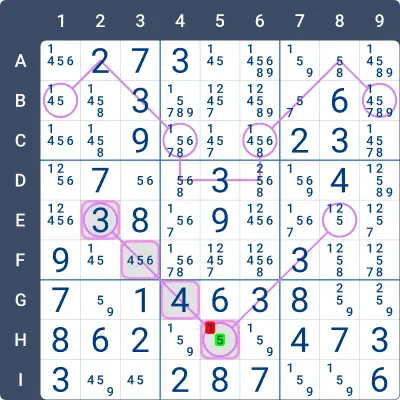
Observe the highlighted Between line in the image below. One end of the line has the digit 3 (E2), and the digit 4 (G4) is already placed on the line.
According to the Between line rules, the digit at the other end of the line must be greater than 3 and, in this case, also greater than 4. Therefore, 1 can be eliminated from H5, and we conclude that H5 = 5.
2. EndOfLineEliminations-2
Level: Medium
When cells along a line are solved, you can eliminate candidates from both ends of the line by using the solved digits and the range between them.
Example
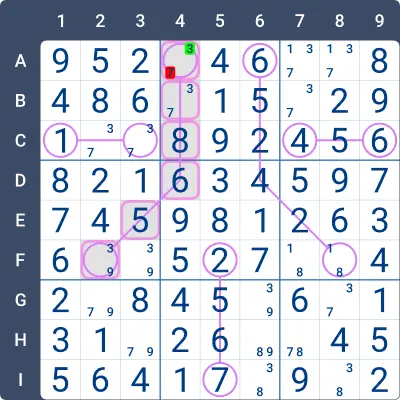
Observe the highlighted Between line in the image below. One digit in the circles must be smaller than all the digits on the line, while the other must be greater than all the digits on the line. The digits 6 (D4) and 8 (C4) are already placed on the line.
Since 7 lies between 6 and 8, it cannot be a valid solution for either circle. Therefore, 7 can be eliminated from A4, and we conclude that A4 = 3.
3. EndOfLineEliminations-3
Level: Advanced
You can eliminate candidates from both ends of a line by analyzing the solved cells, the candidates in the cells along the line, and the range of values between them.
Example
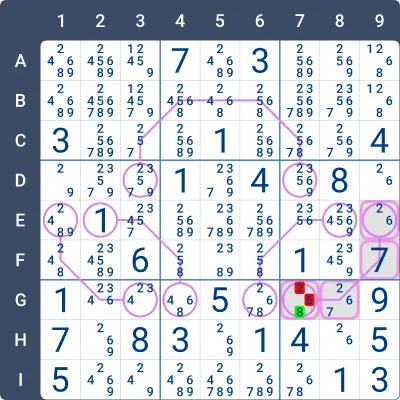
Observe the highlighted Between line in the image below. One digit in the circles must be smaller than all the digits on the line, while the other must be greater than all the digits on the line. The digit 7 (F9) is already placed on the line.
At one end of the line (E9), all candidates are smaller than 7. Therefore, the other end of the line (G7) must contain a digit greater than 7. We can eliminate 2 and 6 from G7, concluding that G7 = 8.
4. SmartEliminations-1
Level: Advanced
When one end of a line is solved, you can eliminate candidates along the line and at the other end by examining the solved cells, the candidates in the line’s cells, and the range of possible values between them.
Example
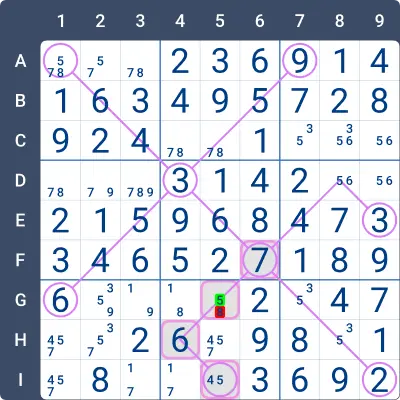
Check the highlighted Between Line in the image below. One end of the line (F6) is 7. The candidates for the other end (I5) are 4 and 5.
The digits on the line must be between 7 and either 4 or 5. Since 8 in G5 is not within this range, it can be eliminated, forcing G5 = 5. Consequently, we can further deduce that I5 = 4.
5. SmartEliminations-2
Level: Advanced
You can eliminate candidates along the line by analyzing the solved cells, the candidates in the line, the range of possible values between them, and the candidates at both ends of the line.
Example
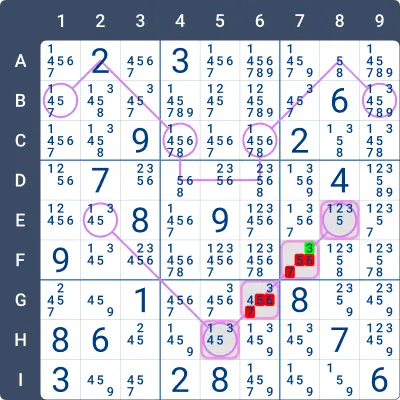
Check the highlighted Between Line in the image below. The candidates at one end of the line (E8) are 1, 2, 3, and 5. The candidates at the other end (H5) are 1, 3, 4, and 5.
Examining the candidates at both ends, it is clear that the digits on the line must be between 2 and 4 (greater than the smallest possible digit, 1, and smaller than the largest possible digit, 5). Therefore, any digit greater than 4 can be eliminated from the middle of the line.
6. CommonEndsLockedSet
Level: Advanced
If a digit must be the solution at one of the ends of the line, you can eliminate that digit as a candidate from all the cells that “see” both ends of the line.
Example
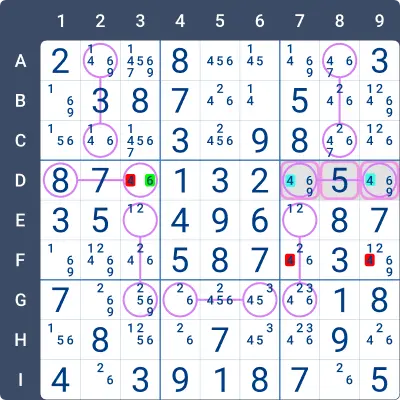
Look at the highlighted Between Lines in the image below. The digit 5 is already on the line, so one of the ends, D7 or D9, must be smaller than 5. The only candidate smaller than 5 at both ends is 4, meaning 4 must be placed at one of these ends.
All the candidates for 4 that can “see” both D7 and D9 can be eliminated. Thus, 4 can be removed from D3, F7, and F9.
7. SmartEliminations-3
Level: Advanced
By examining the candidates at the ends of the line, the solved cells, the candidates along the line, and the puzzle rules, you can identify and eliminate candidates from various cells of the line.
Example 1
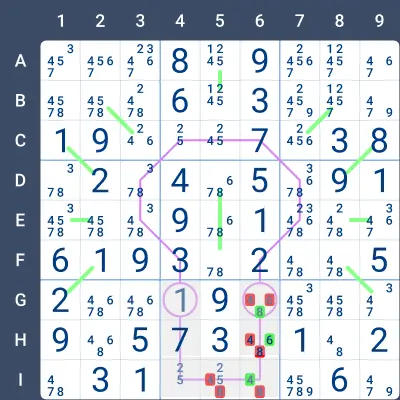
Focus on the shaded line with circles in G4 and G6:
- G4 already contains the digit 1, and the line includes the digit 7. Therefore, the other circle must be greater than 7. Since 9 is already in Row G, the only possible value for G6 is 8.
- The remaining digits in Column 6 are 4 and 6, which must be placed in H6 and I6. Since Row I already contains a 6, the placement is: H6 = 6 and I6 = 4.
Example 2
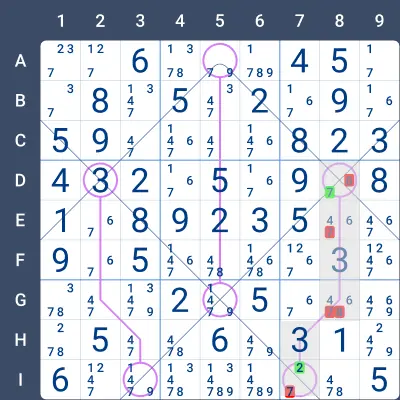
Focus on the shaded line with circles in D8 and I7:
- The line already contains the digit 3, meaning one digit in the circles must be smaller than 3, and the other must be greater than 3.
- For D8, the only candidates are 6 and 7, which implies the other circle, I7, must be smaller than 3. Since Box 9 already contains the digit 1, the only possible value for I7 is 2.
- The largest digit allowed in the circles of this line is 7. This eliminates all digits 7 or greater from the rest of the line. Therefore:
- 7 can be removed as a candidate for E8 and G8.
- 8 can be ruled out for G8.
- The remaining two cells on the line, E8 and G8 (in Column 8), must contain the digits 4 and 6. Since 6 is confined to these two cells, it can be eliminated as a candidate for D8, leaving D8 = 7.
Practise this strategy with built-in step-by-step hints inside our apps.