Running Cells
variantIn Running Cells, the number of consecutive cells in a row or column must match the number indicated to the left of the row or above the column.
In Running Cells, the number of consecutive cells in a row or column must match the number indicated to the left of the row or above the column.
To solve a puzzle with Running Cells, you need to analyze the possible combinations of digits that can satisfy the given number and eliminate digits accordingly. Consider the “What-if?" scenario: ask yourself how many running cells a row or column should have if a specific digit is placed in a particular cell.
Tips:
- A row (or column) with 0 consecutive cells has no consecutive digits in that row (or column).
- A row (or column) with 3 consecutive cells must have 3 adjacent cells with consecutive digits.
Smart Eliminations
Level: Advanced
By analyzing all possible digit combinations in a row or column, you can eliminate digits that would violate the Running Cells count if placed in that cell.
Let’s explore a few examples and demonstrate the logic used.
Example 1
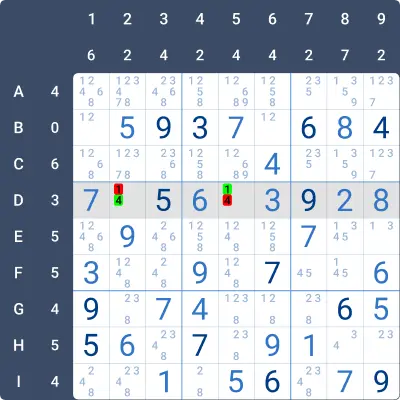
Look at the shaded Row D. The row must contain three cells with consecutive digits. Seven digits are already given, and the only two missing digits are 1 and 4. Currently, the row has only two consecutive digits: 5 and 6 in D3 and D4.
The only way to achieve three consecutive digits with the remaining digits is if D2 = 4 and D5 = 1. When D2 = 4, we get three consecutive digits 4, 5, and 6 in cells D2, D3, and D4.
Example 2
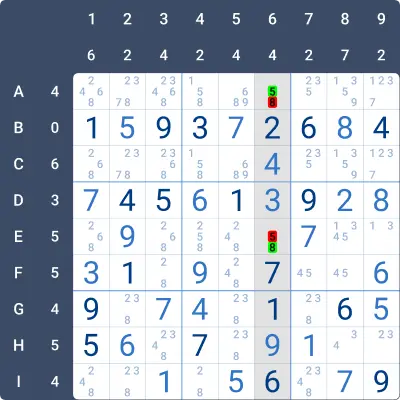
Now, look at the shaded Column 6. The column must contain four cells with consecutive digits. Seven digits are already given, and the only two missing digits are 5 and 8. Currently, the column has only two consecutive digits: 4 and 3 in C6 and D6.
To achieve four cells with consecutive digits, E6 must be 8. This will create two more consecutive digits, 8 and 7, in E6 and F6, giving the column the required four consecutive cells: C6 & D6 (4, 3) and E6 & F6 (8, 7).
Example 3
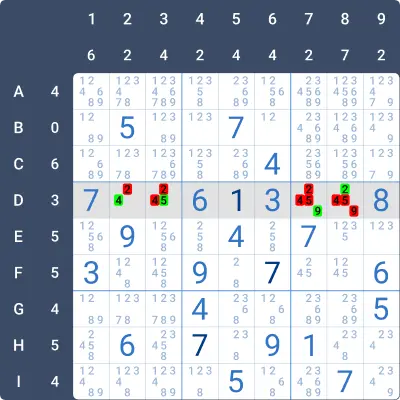
This example is more challenging. Look at the shaded Row D, which must have 3 consecutive digit cells. Five digits are already given (7, 6, 1, 3, 8). Currently, there are no consecutive digits in the row. The only way to achieve exactly 3 consecutive digits is if the 3 cells are adjacent. Let’s examine the possibilities:
- Box 4 already has a 9 in E2, so 9 must be in D7 or D8. If D8 = 9, there would be only 2 consecutive cells in Row D (D8 and D9). Therefore, D7 = 9.
- If D8 = 5, there will be no consecutive digits in the row → D8 ≠ 5.
- If D8 = 4, the remaining digits 2 and 5 will either create only 2 consecutive cells or none at all (in D2 and D3) → D8 ≠ 4 → D8 = 2.
- Finally, 4 and 5 must be in D2 and D3. The only way to achieve 3 consecutive digits is if D2 = 4 and D3 = 5.
Practise this strategy with built-in step-by-step hints inside our apps.