Index Lookup
variantIn Index Lookup, marked cells act as GPS pointers - the digit inside tells you exactly where to find that cell’s own row or column number. A cell may have Horizontal arrows, Vertical arrows, or both.
In Index Lookup, marked cells act as GPS pointers - the digit inside tells you exactly where to find that cell’s own row or column number. A cell may have Horizontal arrows, Vertical arrows, or both.
- When a cell in Column X has horizontal arrows, its digit tells you which column contains the digit X in that row.
- When a cell in Row Y has vertical arrows, its digit tells you which row contains the digit Y in that column.
Index Lookup includes several strategies, each revealing logic in a different way and at increasing levels of difficulty.
Index Lookup Strategies
1. IndexToTarget
Level: Easy
Once an Index Cell is solved as X:
- ↔ Horizontal Arrows: In the same Row, the index cell’s column number moves to Column X.
- ↕ Vertical Arrows: In the same Column, the index cell’s row number moves to Row X.
Example
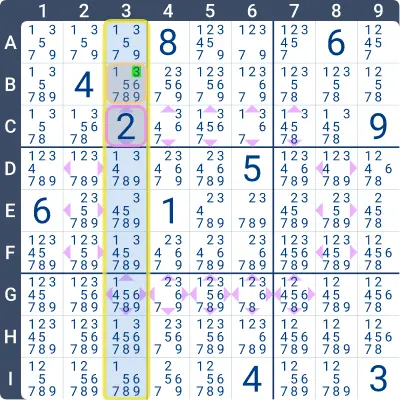
Look at the highlighted Index Lookup cell B3 in the image below.
It has vertical arrows, meaning the digit inside it (2) points to the row position of digit 3 in that column.
So, in this column, 3 must be in row 2 - therefore B3 = 3.
2. TargetToIndex
Level: Easy
Once a Target Cell is solved as T:
- ↔ Horizontal Arrows: In the same Row, if Column T contains an index symbol, place the current column number into that index cell.
- ↕ Vertical Arrows: In the same Column, if Row T contains an index symbol, place the current row number into that index cell.
Example
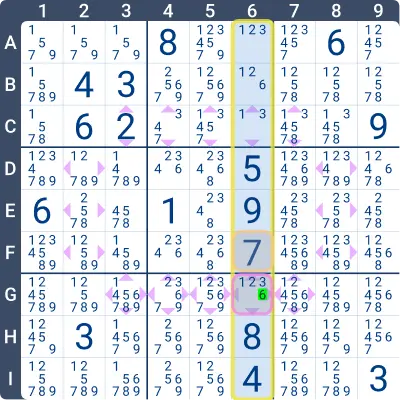
In the image below, cell G6 is the index cell for digit 7 (row G) in column 6.
Since F6 = 7 and F is row 6, it follows that G6 = 6.
3. IndexEliminationByTarget
Level: Medium
Use Target Cell candidates to eliminate possibilities from an Index Cell:
- ↔ Horizontal Arrows: If a cell in Column X has an index symbol, examine its Row.
Eliminate any column number from that index cell if the corresponding target cell cannot contain X. - ↕ Vertical Arrows: If a cell in Row X has an index symbol, examine its Column.
Eliminate any row number from that index cell if the corresponding target cell cannot contain X.
Example
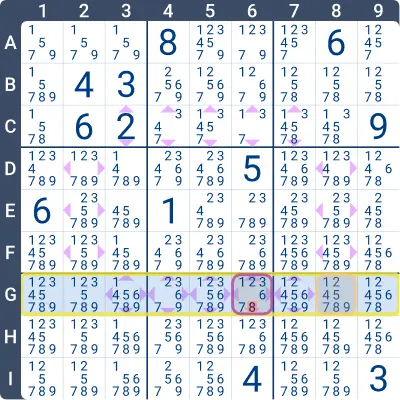
In the image below, cell G6 has both horizontal and vertical arrows.
Focusing on the horizontal arrows: cell G8 does not allow digit 6.
If G6 = 8, then G8 would have to be 6, which is impossible.
Therefore, 8 can be eliminated from G6.
4. TargetEliminationByIndex
Level: Medium
Use Index Cell candidates to eliminate values from Target Cells:
- ↔ Horizontal Arrows: Locate the index symbol in Column X.
In that same Row, eliminate X from any target cell whose column number is not a candidate in the index cell. - ↕ Vertical Arrows: Locate the index symbol in Row X.
In that same Column, eliminate X from any target cell whose row number is not a candidate in the index cell.
Example
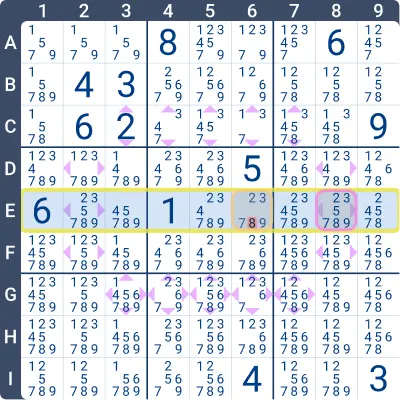
In Row E below, cell E8 has horizontal arrows and does not allow digit 6.
This means 6 cannot be the index for column 8, so 8 can be eliminated from cell E6.
Practise this strategy with built-in step-by-step hints inside our apps.