Sandwich
variantThe Sandwich variant has multiple strategies with varying degrees of difficulty.
The Sandwich variant has multiple strategies with varying degrees of difficulty.
These strategies involve:
- Examining the possible placement of 1 and 9 based on the sum of a row or column.
- Determining the placement of other digits in the row and columns using the combinations that compose the specific sum.
We’ve prepared a helpful YouTube video demonstrating how to solve a Sandwich puzzle: Sandwich YouTube Video.
Tips for solving Sandwich puzzles:
- When the sum of a row/column is 35, since the sum of a row or column is always 45, 1 and 9 must be at the edges of that row/column.
- When the sum is 0, the digits 1 and 9 must be adjacent to each other.
- When the sum is 2, 3, or 4, the digits 1 and 9 are separated by exactly one cell.
- Tap on a row/column sum to see all possible combinations for that sum in the Combination Panel above the board. You can hide this panel in Game Settings if desired.
- When a combination is determined not to be the solution, you can tap it, and it will be grayed out.
- To mark a row/column as completed, long press its sum, and it will appear as completed.
Sandwich Strategies
1. 19OnlyOption-1
Level: Simple
1 or 9 is already solved. Based on the length of the combinations, there is only one cell where the closing 1 or 9 can be placed.
Example:
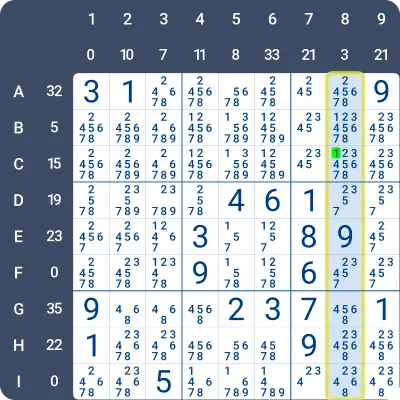
Look at the highlighted column in the image below. E8 = 9 and the sandwich sum of the column is 3.
Since 3 can only be achieved with a single combination (3) of length 1, the closing 1 must be two cells away from the 9 (E8). The options for placing 1 are C8 or G8.
- G8 is in box 9, which already contains a 1.
- Therefore, the only remaining option for 1 is C8.
2. 19OnlyOption-2
Level: Simple
On one side of the 1 or 9, there’s no room for the closing 1 or 9, or the sum of the digits does not match. On the other side of the 1 or 9, the digits next to 1 or 9 already add up to the required sum, so the 1 or 9 must be placed in the adjacent cell.
Example:
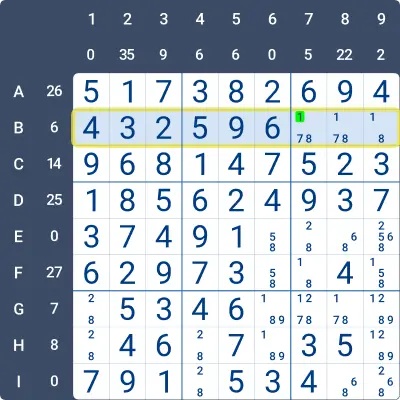
Look at row B in the image below. The sum of the row is 6, and B5 = 9.
Since there is no space for 1 on the left side of B5, and B6 = 6, the only way to achieve the row sum of 6 is for B7 to be 1.
3. LastDigitForSum
Level: Simple
If only one digit is missing to complete the sum, you can find it by subtracting the total of the existing digits between the 1 and 9 from the sum required for the region.
Example:
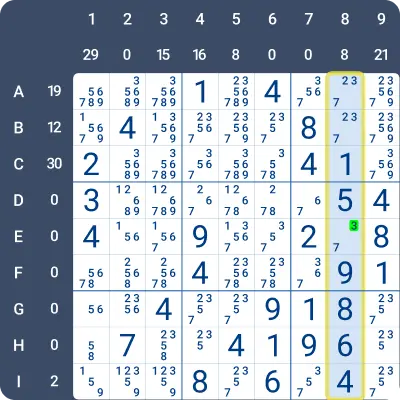
Look at the highlighted column in the image below. The sum of the column is 8. The digits 1 (C8) and 9 (F8) are already placed in this column.
Since D8 between 1 and 9 contains the digit 5, there is only one remaining empty cell (E8). Therefore, E8 = 8 - 5 = 3.
4. Eliminate31To33
Level: Medium
If a region’s sum is 31, 32, or 33, it must consist of 6 digits. This means 1 and 9 cannot be in the middle five cells( columns: 3,4,5,6,7; rows: C,D,E,F,G) of the region, because placing them there would make it impossible to create a length of 6 reaching either end of the region. ( region refers to a row or column.)
Example:
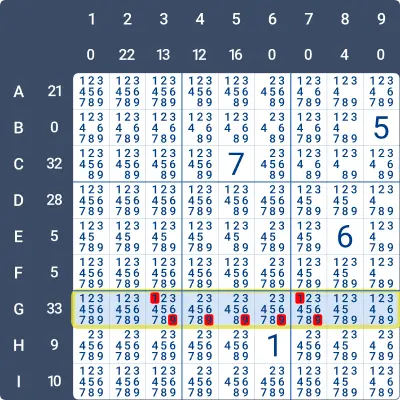
Look at the highlighted row in the image below. The sum of the row is 33. This sum has only one combination (3, 4, 5, 6, 7, 8) with a length of 6.
1 and 9 can be eliminated from G3, G4, G5, G6, G7, because if either were placed in these cells, there wouldn’t be enough room for a 6-cell sequence on either side to complete the required sum.
5. Eliminate19-1
Level: Medium
Based on the possible length combinations for the sum, 1 and 9 can be ruled out from cells in groups shorter than the minimum required length for such a combination.
Example:
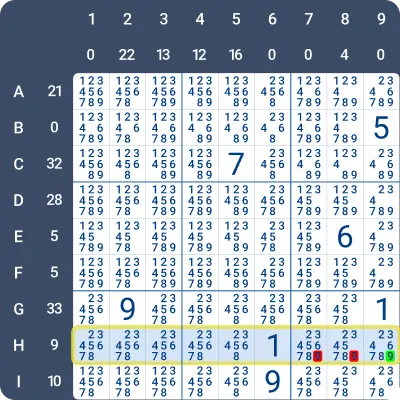
Look at the highlighted row in the image below. H6 = 1. The digit 9 cannot be placed in H1 to H5 because there is already a 9 in these boxes.
The possible combinations for 9 are: “27”, “36”, “45”, and “234”.
The lengths of these combinations are either 2 or 3. Since there is room for only 2 cells to the right, H9 must be 9. Additionally, we can eliminate (gray out) “234” as a possible sandwich sum for this row.
6. Sum35
Level: Simple
If a region’s sum is 35, the digits 1 and 9 must be placed at the two far ends of the region. ( region refers to a row or column.)
Example:
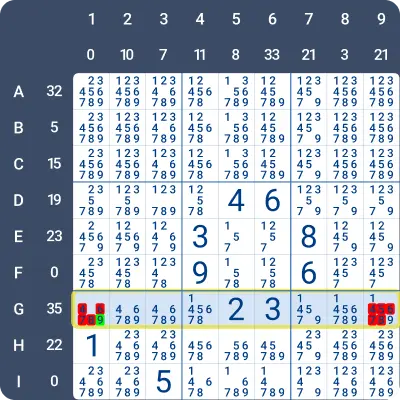
Look at the highlighted row in the image below. The sum of the row is 35. The combination for 35 includes all the digits between 1 and 9: 2, 3, 4, 5, 6, 7, 8. Therefore, the only possible positions for 1 and 9 are at the far ends of the row, in G1 and G9.
As a result, all digits other than 1 and 9 can be eliminated from G1 and G9. Since there is already a 1 in column 1, G1 = 9.
7. Eliminate19-2
Level: Medium
The only possible candidates for the cell are 1 and/or 9. You can eliminate 1 or 9 from cells if placing them there would create a 1/9 pair that is either too close or too far apart to satisfy the required sum combinations.
Example:
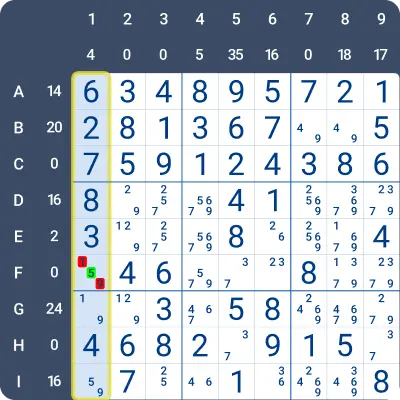
Look at the highlighted column in the image below. The column sum is 4, and the only possible combination for 4 is 4 itself. With H1 = 4, the digits 1 and 9 must be placed in the adjacent cells, G1 and I1.
Therefore, 1 and 9 can be eliminated from F1, leaving F1 = 5.
8. Sum27To30
Level: Advanced
If a region’s sum is between 27 and 30, it must include at least 5 digits. This means 1 and 9 cannot be placed in the middle three cells (columns 4, 5, 6 or rows D, E, F) of the region because doing so would make it impossible to form a group of at least 5 digits extending to either end of the region. (A region refers to a row or column.)
Example:
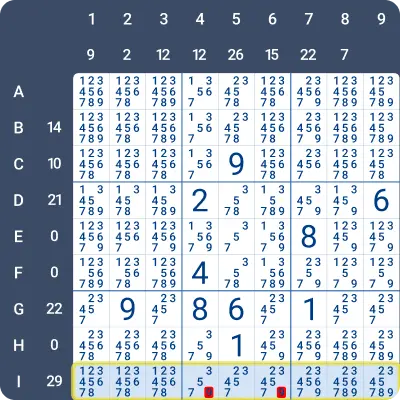
Look at the highlighted row in the image below. The sum of the row is 29. The possible combinations for 29 are: (3, 5, 6, 7, 8) and (2, 3, 4, 5, 7, 8).
The lengths of these combinations are 5 and 6. 1 and 9 can be eliminated from the middle three columns because placing either in these cells would leave insufficient room for a sequence of at least 5 cells to complete the required sum.
Therefore, 9 can be eliminated from I4 and I6.
9. Sum22To26
Level: Advanced
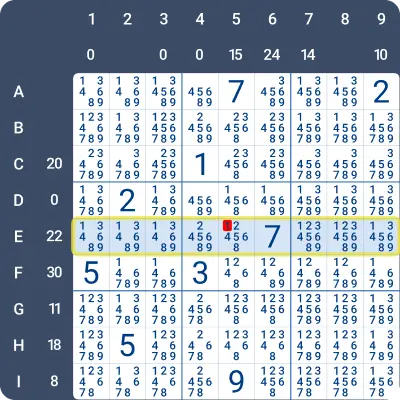
If a region’s sum is between 22 and 26, it must include at least 4 digits. This means 1 and 9 cannot go in the center cell (column 5 or row E) because placing them there would make it impossible to create a group of at least 4 digits reaching either end of the region. (A region refers to a row or column.)
Example:
Look at the highlighted row in the image below. The sum of the row is 22. The possible combinations for 22 are: (2, 5, 7, 8), (3, 4, 7, 8), (3, 5, 6, 8), (4, 5, 6, 7), (2, 3, 4, 5, 8), and (2, 3, 4, 6, 7).
The lengths of these combinations are 4 and 5. 1 and 9 can be eliminated from the middle column of this row because placing either in this cell would leave insufficient room for a sequence of at least 4 cells to complete the required sum.
Therefore, 1 can be eliminated from E5.
10. Sum2To4
Level: Advanced
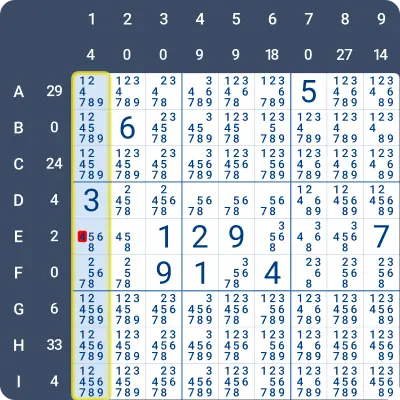
For a single-digit sum (X), the sequence 1, X, 9 (or 9, X, 1) must appear in the region.
- If X is already placed in the region, 1 and 9 must occupy the cells directly next to it.
- If 1 and 9 cannot surround a candidate for X, then X can be eliminated from that cell.
Example:
Look at the highlighted column in the image below. The column sum is 4, which has only one possible combination: the digit 4 itself.
The surrounding cells of E1 are D1 and F1, and neither of them can contain the digits 1 or 9. Since the digit 4 in this column must be surrounded by 1 and 9, 4 can be eliminated from E1.
11. CommonDigits-1
Level: Advanced
If only one combination works as a solution, any digits not in this combination can be eliminated from the cells between 1 and 9. Additionally, all digits from the valid combination can be removed from cells outside the range between 1 and 9.
Example:
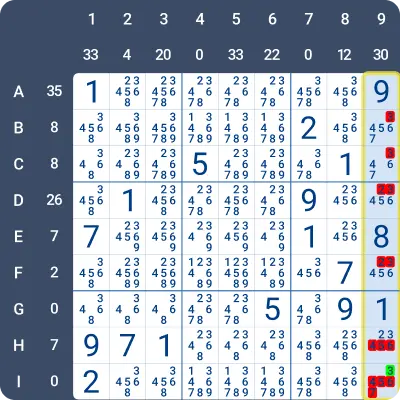
The sum of the highlighted column in the image below is 30.
The possible combinations for 30 are: (4, 5, 6, 7, 8) and (2, 3, 4, 6, 7, 8). The digits 1 (G9) and 9 (A9) are already placed in the column, and the distance between them is 5.
Only the combination (4, 5, 6, 7, 8) can fit the remaining cells. Since 2 and 3 are not part of this combination, they can be eliminated from the cells between 1 and 9. Additionally, 4, 5, 6, and 7 are part of the combination and can be eliminated from the cells that are not between 1 and 9.
12. CommonDigits-2
Level: Advanced
When a set of digits is shared across all valid combinations for the sum, several decisions can be made depending on the situation:
- If the location of one 1 or 9 is known, these digits can be eliminated from cells that are farther away than the maximum length of a valid combination.
- If both 1 and 9 locations are known, these digits can be eliminated from cells outside the range of cells between the 1 and 9.
- If a shared digit is already solved, the 1 or 9 cannot be placed farther from that digit than the maximum combination length allows.
Example:
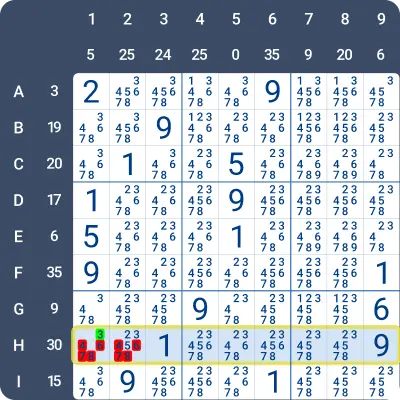
The sum of the highlighted row in the image below is 30.
The possible combinations for 30 are: (4, 5, 6, 7, 8) and (2, 3, 4, 6, 7, 8). The digits 1 (H3) and 9 (H9) are already placed in the row.
Both combinations for 30 include the digits 4, 6, 7, 8. Since these digits must be placed between 1 and 9, 4, 6, 7, and 8 can be eliminated from cells that are not between 1 and 9. Therefore, 4, 6, 7, and 8 can be eliminated from H1 and H2.
13. Eliminate19-3
Level: Advanced
1 or 9 can be ruled out from cells if the distance between them is not allowed lengths for valid combinations that make up the sum.
Example:
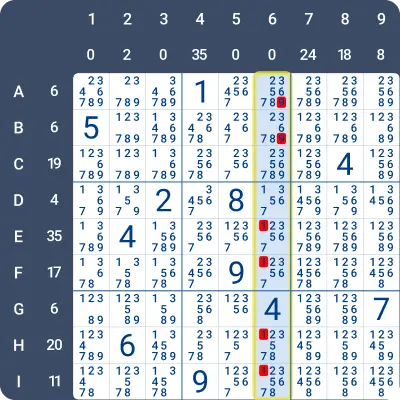
The sum of the highlighted column in the image below is 0. When the sum is 0, 1 and 9 must be placed in adjacent cells within the column. Based on this, we can eliminate some cells as potential solutions for 1, 9, or both.
- 9 can be eliminated from A6 and B6, because the adjacent 1 would have to be in box 2. However, box 2 already contains a 1 in A4.
- 1 can be eliminated from E5, because any adjacent 9 would have to be in box 5, but box 5 already contains a 9 in F5.
- 1 can be eliminated from F6, because any adjacent 9 would either have to be in box 5 (which already contains a 9 in F5) or in G6. However, G6 contains a 4.
- 1 can be eliminated from H5 and I5, because the adjacent 9 would have to be in box 8, but box 8 already contains a 9 in I4.
14. Eliminate19-4
Level: Advanced
If the location of 1 or 9 is already known, the other (closing) 1 or 9 can be eliminated from cells that are either too close (shorter than the minimum required length) or too far (longer than the maximum allowed length) to form a valid combination.
Example:
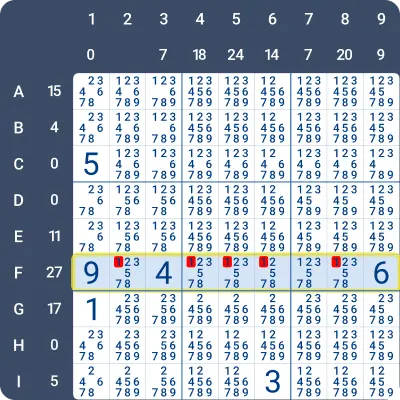
Look at the highlighted row in the image below. The row sum is 27 and F1 = 9.
The possible combinations for 27 are:
- (2, 4, 6, 7, 8)
- (3, 4, 5, 7, 8)
- (2, 3, 4, 5, 6, 7)
Notice that F9 = 6, and since it is at the far right of the row, it cannot participate in the combinations for 27. The only remaining valid combination is (3, 4, 5, 7, 8) with a length of 5.
Therefore, we can eliminate 1 from all the cells that are not exactly 5 cells away from F1. This leads us to conclude that F7 = 1.
15. ValidCombinations
Level: Advanced
By analyzing all the possible combinations and their digits, you can make elimination decisions for several digits across multiple cells.
This strategy is better explained by reviewing a few examples and explaining the decision process.
Example 1:
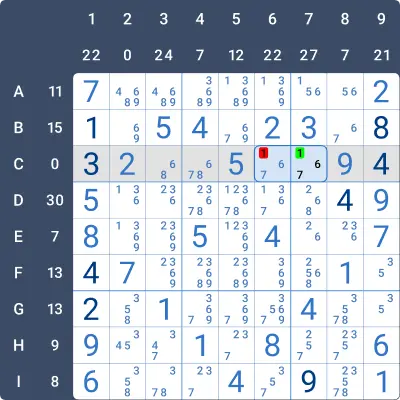
This is a simple example. Here we are looking at Column 3
According to digit combinations for Row C: 1 goes in cell C7.
Why? - The sum of Row C is 0, which means that 1 and 9 have to be next to one another. 9 is already filled in Row C. On one side the 9 has the digit 4, therefore 1 must be on the other side → C7=1.
Example 2:
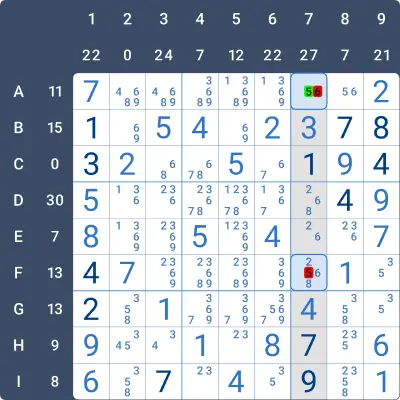
According to digit combinations for Column 7: 5 goes in A7
The combinations for 27 are: “24678”, “34578” , “234567”
Why? - Look at Column 7, its sum is 27. 1 and 9 are already filled in the column. The distance between the 1&9 is 5. The combination for 27 must include the digits 4&7 (already filled between 1&9 on the board) and cannot include the digit 3(already filled outside the range of 1&9).
Decisions based on the data:
- We can eliminate the combination of “234567” because it has 6 digits, and we are looking for 5 digits long combinations.
- We can eliminate the combination of “34578” because it includes the digit 3.
- The only remaining combination is “24678” which must be the solution. This combination doesn’t include the digit 5. There is only one unfilled cell in the column, outside the range of 1&9, the cell is A7 which must be 5.
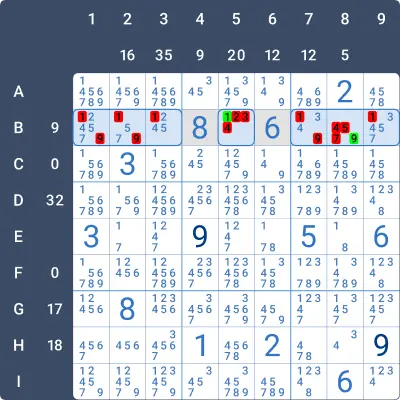
Example 3:
This is an interesting example, the board contains the Sandwich and the Non-consecutive variants.
According to digit combinations for Row B: 1 goes in B5 and 9 goes in B8 The sum of row B is 9. The combinations for 9 are: “27”, “36”, “45”, “234”
Let’s explore the decision process:
- The combinations “45” can be eliminated, because 4 and 5 are consecutive and cannot be next to one another.
- The combination “234” can be eliminated because of the same reason, there is no way to place three consecutive digits without having two consecutive digits next to one another.
- The remaining combinations are 2 digits long. 1&9 can be eliminated from B1 & B7, because 8(B4) holds the place where the closing 9&1 would have to be.
- 1&9 can be eliminated from B2 and B3, because the combinations for 9 would include 8 and no combination for 9 has 8 in it.
- 1&9 can be eliminated from B9, because 6(B6) holds the place where the closing 9&1 would have to be.
- The remaining two cells are B5 and B8 which must be the solution for 1&9. 9 cannot be in B5, because it will be next to an 8, which it cannot by the “Non-consecutive” rules. Therefore, B5 must be 1 and B8 must be 9.
Practise this strategy with built-in step-by-step hints inside our apps.