Two-String Kite
expertThe Two-String Kite involves two strong links on the same candidate (a), starting from different regions but converging in a shared region (row, column, or box). Digit a can be eliminated from any cell that sees both far ends of the links.
Two-String Kite is an advanced strategy, relatively easy to spot and apply.
What is Two-String Kite?
- Involves two Strong Links on the same digit (a) with distinct starting and ending points.
- One end of each Strong Link must share the same Region (row, column, or box).
Eliminations
Eliminate a from cells that see both ends of the Strong Links that are not in the same region.
Why is it true?
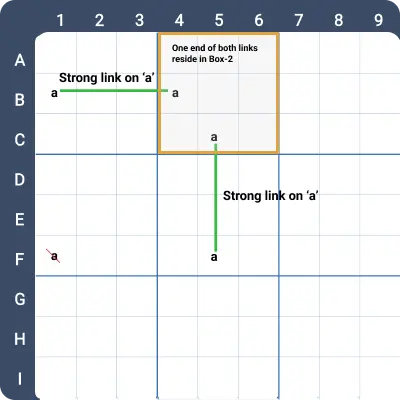
Observe the image below, which illustrates a Two-String Kite setup:
- Two distinct Strong Links on digit a: one between B1 and B4, the other between C5 and F5.
- Both links share one end in Box 2.
Now:
- If B4 = a, then F5 = a, and a can be eliminated from F1.
- If B4 ≠ a, then B1 = a, and a can be eliminated from F1.
- Regardless of which end of each Strong Link contains a, the cells that see both ends cannot contain a.
Example 1
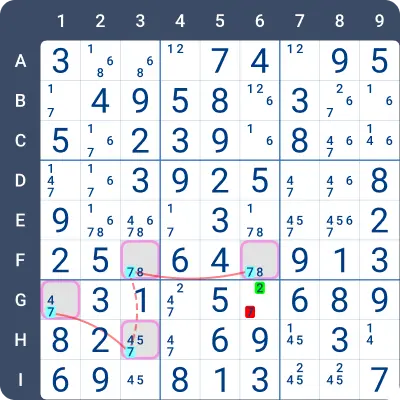
Observe the image below. This is a Two-String Kite setup for the digit 7.
There are two strong links: the first between F3 and F6, and the second between G1 and H3. One end of both links is in the same region, column 3. The 7 in G6 sees both ends of the links and can therefore be eliminated.
Example 2
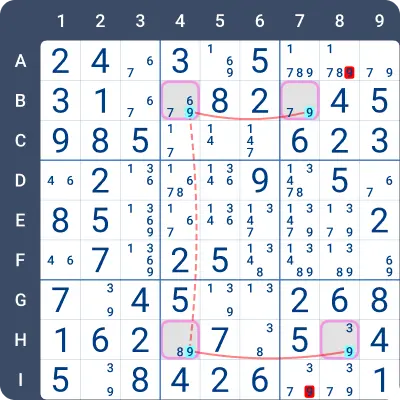
The image below shows another Two-String Kite setup for the digit 9.
There are two strong links on 9 in rows B and H, with one end of each link in column 4. The digit 9 can be eliminated from any cell that sees both of the other ends. Thus, 9 can be eliminated from A8 and I7.
Practise this strategy with built-in step-by-step hints inside our apps.